Category: Windows

  • TDM Oracle Database Tips

    Environment:

    • TDM 2018+
    • Oracle 19c
    • Windows10/11

    Tips:

    • Do NOT change ORACLE_HOME\network\admin\sqlnet.ora
      • Some document was said to change AUTH… to (none). Do NOT change and keep it as (NTS) in Windows10/11, or it might cause some problem during DB creation and startup.
    • Avoid to install both Oracle DB Server and Client in same machine(Standalone)
    • Old TDM version(2018 or early) may still need 32bit Oracle Client. test.udl file can only verify 64bit, NOT 32bit OLE DB component.
    • Newer TDM version does not need TNSName anymore
    • SQL to check Database character(Unicode/non-Unicode)
    SQLPLUS > select value from nls_database_parameters
  • Win11 启用自动登录

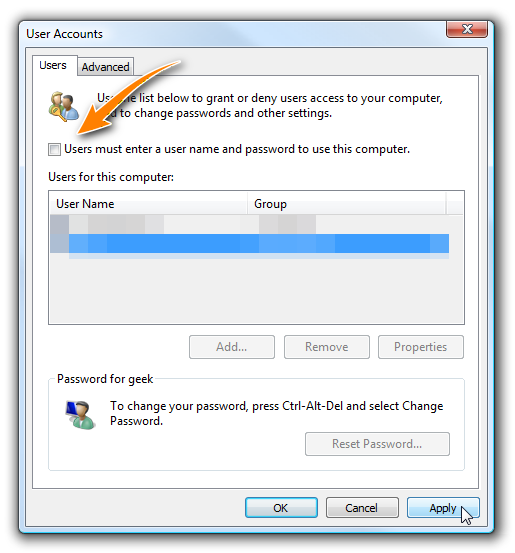
    默认安装的Windows 11没有启用自动登录的选项,以下方法首先修改注册表启用选项,然后使用userpasswords2自动登录界面进行设置。

    Uncheck the box to enable the user with autologon
    1. WIN+R > regedit
    2. WIN+R > control userpasswords2
    Computer\HKEY_LOCAL_MACHINE\SOFTWARE\Microsoft\Windows NT\CurrentVersion\PasswordLess\Device

    Reference: How to Log In Automatically to Windows 11

  • WSL – Win11 安装手册

    Pre-requirements:

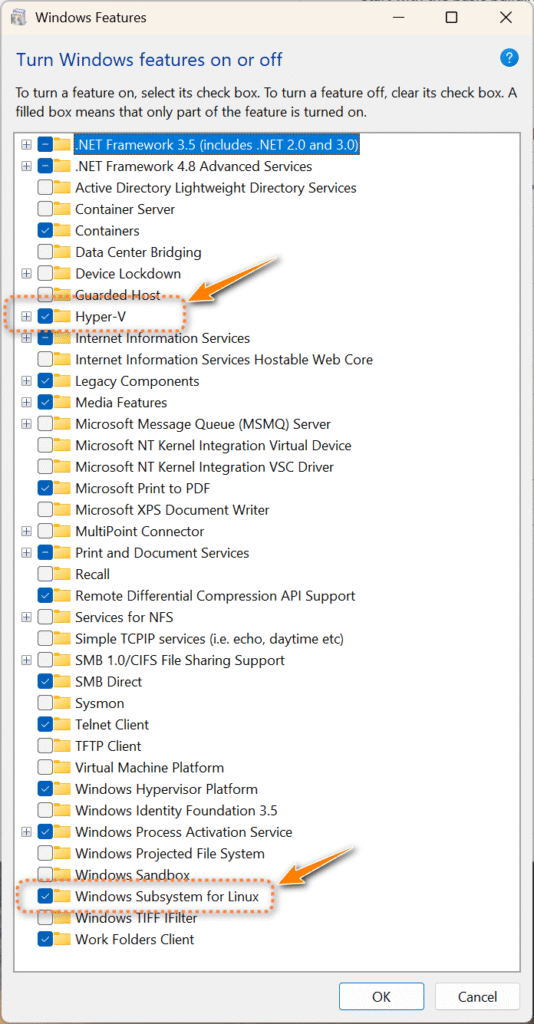
    Windows Feature:

    + Hyper-V

    +Windows Subsystem for Linux

    start > powershell (as Administrator)
    PS> wsl --install
    
  • Win11创建本地用户账号和自动登录的方法

    参考链接:

    https://www.pctips.com/create-local-user-account

    已经成功通过【设置】页创建本地账号,接下来需要研究一下:

    1. 如何自动登录或者kiosk模式的方法
    2. 设置自启动程序的方法